

Looking to change your IT provider? Don’t worry – we’ve got you covered.

0203 358 0203

hello@irondome.co.uk

Is an IT Health Check Worth It If Nothing Is Broken?

Smiling man in a blue shirt holds his eyeglasses in front of a teal and pale green abstract background.

An IT health check for small business is a proactive review of your technology, security and IT setup. It can identify outdated software, untested backups, unnecessary costs, access issues and other risks that are difficult to spot during normal day-to-day work.

Even when everything appears to be working, a health check can confirm that your IT is in good shape, highlight sensible improvements or uncover something that needs attention before it causes disruption. The point is not to go looking for trouble. It is to replace assumptions with a clearer picture of how healthy your IT really is.

“It’s fine. Nothing’s broken.”

We hear this a lot, and it is an understandable way to look at IT.

Your laptops turn on. Emails send. Files open. Nobody has appeared at your desk for the third time today to complain about the Wi-Fi.

Why go looking for problems?

Because there is a difference between IT that is working and IT that is healthy.

Plenty of technology problems stay quietly in the background without affecting your working day. A backup might be running but never have been tested. An old user account might still have access to company data. Software could be approaching the end of its supported life.

None of those things necessarily stop somebody working today.

An IT health check for small business gives you a clearer view of what is happening beneath the surface, so you can make informed decisions rather than relying on everything looking okay from the outside.

What Is an IT Health Check for Small Business?

An IT health check is a structured review of the technology your business relies on.

Rather than waiting for something to fail and then investigating it, the aim is to understand the condition of your IT now.

The exact scope will depend on your business and the provider carrying out the review, but it may look at areas such as security, backups, user access, hardware, software, cloud services and your wider IT setup.

A useful health check should answer practical questions. Is your business appropriately protected? Can your data be recovered if you need it? Do the right people have access to the right things? Are ageing devices likely to create problems or unexpected costs? Is your current setup still suitable for the business you have today?

Most importantly, you should understand the answers.

A health check that leaves you with 40 pages of technical terminology and no idea what to do next has rather missed the point.

What Does an IT Health Check Actually Include?

There is no single checklist that applies to every business, because a 15-person professional services company will have different technology requirements from a 90-person manufacturer.

However, a typical IT health check may review:

  • Cyber security controls, including multi-factor authentication, software updates and device protection
  • Backups, including how information is backed up and whether it can actually be restored
  • User accounts and permissions, particularly how starters, movers and leavers are managed
  • Hardware, software, cloud services and licensing to identify ageing technology, gaps or unnecessary costs

The result should give you a straightforward picture of what is working, what could be improved and what, if anything, needs more immediate attention.

Why Can “Nothing Is Broken” Be Misleading?

Some IT problems are obvious.

When the internet goes down or a laptop refuses to start five minutes before an important meeting, you know about it.

Others are much quieter.

An old account belonging to somebody who left six months ago does not necessarily cause a problem every morning. Neither does an untested backup, an ageing device or software that has fallen behind on updates.

That does not automatically mean your business is in immediate danger. It simply means that day-to-day performance does not tell you everything about the health of your IT.

Businesses change too.

People join and leave. New software gets introduced. Teams grow. Devices get older. Cloud services are added. Working habits change. Security recommendations develop over time.

A setup that was perfectly sensible three years ago might not be the right setup for the business you have now.

A health check gives you the opportunity to test those old assumptions.

Is an IT Health Check Only About Cyber Security?

No. Cyber security is an important part of an IT health check, but it is not the whole picture.

A good review also considers resilience, performance, cost and planning.

You might discover, for example, that a large number of laptops will need replacing within the same six-month period. Nothing is wrong with them today, but knowing about that upcoming cost gives you time to budget rather than dealing with a surprise later.

You may be paying for software licences nobody uses. Your internet connection might be more important to the business than it was when it was originally installed. Perhaps a process that worked for ten employees has become unnecessarily awkward now that you employ 40.

These are not necessarily emergencies. They are opportunities to make IT work better for the business.

How an IT Provider Can Help With an IT Health Check

A good IT provider can take an objective look at your current setup and turn technical findings into useful business information.

They can review the areas that matter, identify gaps or unnecessary costs and help you understand which findings deserve attention first.

Just as importantly, they should be comfortable telling you when something is fine.

The purpose of an IT health check should not be to manufacture a shopping list.

If an improvement is recommended, your provider should explain why, what difference it would make, what it is likely to involve and whether it needs doing now or can be planned for later.

That is the sort of relationship we believe businesses should have with their IT partner. Clear advice, practical recommendations and no pressure to buy something simply because somebody has managed to put it in a report.

Sometimes the next step will be action. Sometimes it will be planning. And sometimes the answer really will be, “Everything looks good. Keep doing what you’re doing.”

How Often Should a Small Business Have an IT Health Check?

For many growing small businesses, an annual review is a sensible starting point.

There may be reasons to look sooner.

If you have grown quickly, recruited a significant number of people, changed premises, moved systems into the cloud or introduced important new software, it can be worth reviewing whether your IT has kept pace.

The same applies if your business has changed how it handles sensitive information or if you simply cannot remember the last time anyone took a proper look at the whole setup.

It does not have to become a constant exercise.

The aim is to create a sensible rhythm where IT gets reviewed before assumptions become outdated.

Can We Do an IT Health Check If We Already Have an IT Provider?

Yes.

Having an existing IT support provider does not mean a health check is unnecessary, and getting a health check does not automatically mean you are looking to replace them.

Your current provider may already carry out regular reviews as part of their service. If so, ask what they review, how frequently they do it and how they report the findings to you.

A separate health check can also provide another perspective if you want reassurance about your current setup.

The important thing is to be clear about why the review is happening.

This should not become an exercise in finding fault with another provider. The useful question is whether your technology is supporting your business properly today and whether anything needs attention.

What Should You Get at the End of an IT Health Check?

You should finish with more clarity than you started with.

That sounds obvious, but it matters.

A good report should not simply present a list of technical problems. It should explain what was checked, what was found and what those findings mean for your business.

Where action is recommended, there should be some sense of priority.

Something that needs addressing promptly should not be buried alongside a minor improvement that can comfortably wait until next year’s budget.

You should also feel able to ask questions.

If a recommendation comes with a significant cost, you should understand why it is being suggested, what happens if you do nothing and whether there are alternative approaches.

Good IT advice helps you make a decision. It does not make the decision feel deliberately complicated.

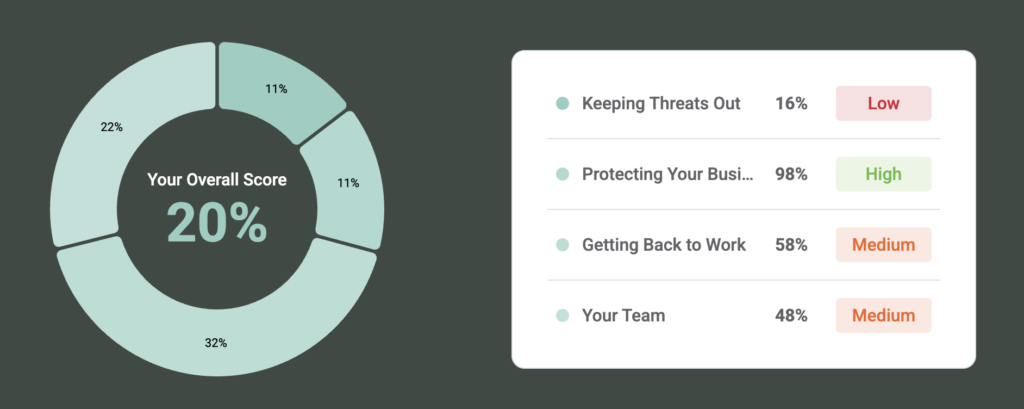
Donut chart on a dark background showing 'Your Overall Score 20%' with four surrounding percentage slices (11%, 11%, 32%, 22%). The right side has a white panel with four risk items and colored status pills (Low, High, Medium, Medium).

Could your business keep
working if something went wrong?

Answer 10 simple questions and discover how resilient your business really is.
You’ll see what’s working well, where there may be gaps, and the practical steps that could make the biggest difference.

As an National Cyber Security Centre (NCSC) assured service provider we can help support your business on your cyber security journey. We are on a mission to help all businesses be protected and remove the hurdles and complexities that can come with cyber. 

What Are the Possible Outcomes of an IT Health Check?

One concern business owners sometimes have is that an IT health check will inevitably find a long list of expensive things that need fixing.

It should not work like that.

There are broadly three outcomes, and one of them is simply that everything looks good.

1. Everything Is in Good Shape

There is genuine value in confirmation.

If your backups are working and recoverable, appropriate security controls are in place, devices are within their expected lifecycle and user access is being managed properly, knowing that gives you a much firmer footing.

You are no longer assuming things are okay. You have checked.

That can be particularly useful when you are responsible for employees, client information and the smooth running of the business.

2. There Are Some Sensible Improvements to Make

This is probably the least dramatic outcome, and often a useful one.

Perhaps multi-factor authentication has been introduced but not applied everywhere. Some devices may need replacing over the next year. Maybe an old user account needs removing or a backup process could be improved.

None of these findings needs to cause panic.

A useful health check should help you prioritise improvements based on importance, cost and the needs of the business. Not everything needs doing tomorrow.

3.There Is a Risk That Needs Attention

Sometimes a review does uncover something more significant.

It could be unsupported software, an issue with backups, inappropriate access to information or a security setting that needs correcting.

Finding it during a planned review gives you the chance to understand the problem and decide what to do next.

That is a much better position than learning about it for the first time when you actually need the system or backup to work.

Is an IT Health Check Worth It for a Small Business?

If nothing is broken, that is a good place to start.

The question is whether you know what is happening beyond the things you can see during an ordinary working day.

An IT health check for small business gives you that visibility. It can confirm that your technology is in good shape, identify a handful of sensible improvements or uncover something worth addressing before it becomes disruptive.

You do not need to go looking for problems for the sake of it. You just need enough information to know where you stand.

And if the answer is that everything is healthy? Great. You can get back to running your business with a little more confidence.

If you are not sure when your IT was last properly reviewed, we’re here to help. Let’s have a chat.

FAQs

Not necessarily. An IT audit is often a more formal exercise and may be linked to specific compliance or regulatory requirements. An IT health check is generally a practical review of your current technology, security, resilience and setup. The exact scope should always be agreed before the review begins.

Usually, it should cause very little disruption. A lot of information can often be reviewed without interrupting normal work. If testing is required that could affect systems or users, your provider should explain this in advance and agree an appropriate time with you.

It depends on the size and complexity of your business and how detailed the review is. A small organisation with a straightforward setup will generally require less work than a larger business with several locations, specialist software and more complex systems. Your provider should make the scope and expected timescale clear before starting.

You can still have an IT health check. Your existing provider may already offer one as part of their service, or you might choose an independent review for another perspective. Either way, it does not have to be about replacing your current provider. The aim is to understand the health of your IT.

It can be. A smaller team can still rely heavily on email, cloud services, laptops, internet access and business data. You may also have fewer people internally with the time or technical knowledge to review those systems regularly. The right health check should be proportionate to your size and give you useful information rather than unnecessary complexity.

More from the Techsphere

Smiling man in a blue shirt holds his eyeglasses in front of a teal and pale green abstract background.

Is an IT Health Check Worth It If Nothing Is Broken?

An IT health check for small business is a proactive review of your technology, security and IT setup. It can

Blue robot holding a glowing light bulb, representing a bright idea

Should Your Business Have an AI Acceptable Use Policy?

An AI Acceptable Use Policy is a clear set of guidelines explaining how employees can safely and responsibly use AI

Three white playing pieces used to depict three people on a teal green background.They have speech bubbles above their head to suggest they are getting a second opinion on your Business IT.

Is It Bad to Get a Second Opinion on Your Business IT?

It is not bad to get a second opinion on your business IT. In fact, it is often a sensible

Book your FREE 15 minute consultation with an IT Expert.